
How to evaluate AP automation software in 2026 (before you commit)

Robert Lynch

Evaluating AI automation software in 2026 is a high-impact decision for finance teams. With growing invoice volumes, tighter controls, and increasing pressure to deliver ROI, choosing the wrong solution can lock organisations into manual work, high exception rates, and costly rework after going live.
This guide outlines how finance and accounts payable leaders can evaluate AP automation before committing. It covers readiness checks, ERP realities, vendor evaluation criteria, and the metrics that matter most. Most importantly, it helps teams make confidence, defensible decisions that stand up beyond the demo.
The hidden traps in AP automation selection
Choosing an AP automation solution often looks deceptively simple. A handful of demos, a feature comparison, a business case, and a signature. On the surface, it feels like a contained project with a clear finish line.
In reality, that simplicity is often an illusion.
Many finance teams only realise something is wrong after the system is live — when automation rates plateau, exceptions still require manual intervention, and confidence in the ROI starts to erode. By that point, reversing course is expensive, politically difficult, and disruptive to already stretched teams.
That’s exactly why we hosted our recent webinar, 2026 Guide to Evaluating AP Automation Before You Commit. The focus wasn’t on software features, but on decision-making: how finance leaders can pressure-test readiness, align stakeholders early, and avoid committing to a solution that looks strong in a demo but struggles in day-to-day operations.
This blog builds on that same framework. It’s written for finance and AP leaders who want to slow the process down just enough to make a decision they can stand over long after implementation.
What poor AP automation decisions cost in reality
Accounts payable sits at the intersection of multiple, often competing priorities. Finance wants efficiency and control. Procurement wants compliance. IT wants security and clean integration. Business users simply want invoices approved without friction.
When those priorities aren’t aligned early, AP automation becomes a technology project trying to solve organisational problems — and that rarely ends well.
Industry benchmarks tell the story:
- Manual AP typically costs $10–$15 per invoice once labour, overhead, and rework are included
- Best-in-class automated teams operate closer to $2–$3 per invoice
- Manual invoice cycle times often stretch to 10–15 days, while top performers average around 3 days
Those gaps represent real money, real time, and real pressure on finance teams. And they aren’t closed by better demos or more features. They’re closed through preparation — understanding readiness, aligning stakeholders, validating ERP realities, and defining success before vendors enter the conversation.
That’s where a structured evaluation framework becomes essential.
A practical evaluation framework (step by step)
Evaluating AP automation doesn’t need to be complicated — but it does need to be deliberate. The steps below reflect a proven approach finance teams use to assess readiness, pressure-test vendors, and make decisions they can stand over long after go-live. Skipping steps or tackling them out of sequence is where most projects start to unravel.
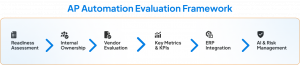
Step 1: readiness checks — before you speak to vendors
The strongest AP automation projects start with internal clarity, not external demos.
Document the current AP process (properly)
Most AP teams believe they understand their process — until they map it. Process documentation nearly always surfaces:
- Hidden subprocesses for specific invoice types
- Workarounds that exist purely because of legacy constraints
- Approval loops that no one remembers designing
- Manual checks added “temporarily” years ago
A useful current-state view includes:
- End-to-end invoice flow from receipt to posting
- Variations by invoice type (PO, non-PO, credit notes, recurring invoices)
- Touchpoints across AP, procurement, and business users
- Average handling time and common failure points
This exercise isn’t about perfection. It’s about visibility. You can’t measure improvement if you don’t know where you’re starting from.
Establish baseline metrics early
Baseline metrics anchor the entire evaluation process. Without them, vendor claims are impossible to verify.
At minimum, finance teams should understand:
- Annual invoice volumes
- Invoices processed per AP FTE
- Average time spent per invoice
- Current exception rate and main causes
- Average cycle time from receipt to posting
These numbers don’t need to be elegant. They just need to be honest.
Define what “success” actually means
One of the most common mistakes in AP automation selection is letting vendors define success for you.
Before engaging anyone externally, finance should agree internally on:
- Target processing cost per invoice
- Acceptable cycle time
- Desired straight-through processing rate
- Reporting and visibility requirements
- Scalability expectations as volumes grow
You can stay flexible — vendor capabilities may expand your thinking — but a defined starting point prevents the process drifting into feature comparisons that don’t move the needle.
Secure cross-functional buy-in early
AP automation is not an AP-only project. Successful initiatives involve early alignment across:
- AP and Finance (process ownership)
- Procurement (PO compliance and controls)
- Business users (approvals and coding)
- IT (integration, security, architecture)
- InfoSec, audit, and compliance
- Executive sponsors (CFO and sometimes board level)
Without this alignment, projects often fail late — after months of demos — due to budget, security, or priority conflicts.
Step 2: Internal ownership — who actually drives this?
Although AP automation is software, ownership should sit with finance. AP and finance teams:
- Understand real-world invoice complexity
- Know which exceptions matter and which don’t
- Define the requirements IT needs to validate integration
Projects frequently stall when the original champion hands responsibility to someone for whom it’s not a priority. A named owner with authority, time, and accountability is non-negotiable.
Step 3: Vendor evaluation — what to require up front
Pressure-test vendors with real data
Demos are designed to impress. Real data is designed to reveal gaps. Before shortlisting, vendors should be willing to review:
- Sample invoices (including your most problematic ones)
- Sample purchase orders
- Coding structures
- Approval hierarchies
This allows you to assess:
- Invoice capture accuracy
- Matching performance
- Exception handling
- Realistic straight-through processing rates
Anyone can promise 90% automation. Fewer can demonstrate it with your data.
Compare total cost per invoice — not just price
Most AP solutions are priced per invoice or transaction. That’s only part of the picture. True cost per invoice includes:
- Software fees
- Residual manual effort
- Exception handling
- Business user involvement
A solution that looks cheaper on paper may cost more in practice if it leaves manual work behind.
Step 4: The metrics vendors should respond to — not introduce
Before demos begin, your internal scorecard should already exist. Key metrics include:
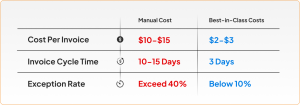
These metrics keep conversations grounded in outcomes, not features.
Step 5: ERP realities that quietly decide success or failure
AP automation lives or dies by ERP integration. Integration Is Not a Checkbox. Key questions to validate early:
- Does the vendor support your ERP and version?
- Is integration real-time or batch-based?
- How are ERP upgrades handled?
- What breaks when something changes?
Your ERP remains the system of record. The automation platform must work with it, not around it.
Use implementation as a data clean-up opportunity
AP automation exposes messy data fast. Common clean-up areas include:
- Vendor master data (inactive suppliers, duplicates)
- Chart of accounts
- Cost centres and legacy structures
It’s not unusual to find that only a fraction of “active” vendors have transacted in the past two years. Cleaning this upfront reduces exceptions later.
User and approval management matters
User roles, approval hierarchies, and access controls should not require duplicate maintenance across systems. Ideally, the AP solution can ingest user data from:
- ERP
- HR or payroll systems
This supports starters, leavers, and approval changes without manual intervention.
Multi-ERP and M&A scenarios are the norm
Many organisations operate multiple ERPs for extended periods, especially during acquisitions. A unified AP layer across systems provides:
- One view of invoices
- Consistent controls
- Better visibility for finance
Vendors should be assessed on their ability to support this reality.
Step 6: AI in AP automation — what to ask, what to avoid
AI is now table stakes — but not all AI delivers value. Align With IT and Security Policies Early. IT teams increasingly require detailed validation around:
- Data security
- Privacy controls
- Model usage
- Bias prevention
If IT can’t sign off, the project stops.
Demand transparency and control
When AI supports matching or decision-making, finance teams need:
- Clear explanations of outcomes
- Full audit trails
- The ability to keep a human in the loop
Automation should increase confidence, not reduce accountability.
Avoid “flashy” AI that solves nothing
If an AI feature doesn’t:
- Reduce manual effort
- Improve accuracy
- Strengthen compliance
- Speed up processing
…it’s a distraction, not an advantage.
Typical timelines: what to expect
While every organisation differs, common benchmarks are:
- Selection phase: 6–12 weeks
- Implementation to go-live: 10–16 weeks
Month-end and year-end pressures often extend timelines, as AP teams must test and train while keeping operations running.
Why reference checks matter more than demos
Vendor claims only become meaningful when validated by customers. Good reference conversations explore:
- How selection decisions were made
- Implementation experience
- Support quality post go-live
- Actual automation and cost outcomes
AP challenges are remarkably consistent across industries, so references outside your sector can still be highly relevant.
Final checklist before you commit
Before signing anything, ensure you’ve:
- Documented your current AP process
- Established baseline metrics and targets
- Aligned stakeholders across finance, IT, and the business
- Pressure-tested vendors with real data
- Validated ERP integration depth and resilience
- Assessed AI with security, transparency, and value in mind
- Spoken to references about real post-go-live outcomes
AP automation can deliver transformational results — but only when the decision is made deliberately. Rushing costs more than waiting.
If you’d like a second set of eyes on your approach — whether you’re early in the process or already shortlisting vendors — our team is happy to help you pressure-test assumptions, metrics, and ERP readiness before you commit.
You can also explore the full framework in our on-demand webinar, 2026 Guide to Evaluating AP Automation Before You Commit, or reach out for a practical discussion based on your environment.
Frequently askedquestions
Most AP automation implementations take between 10 and 16 weeks, depending on ERP complexity, data quality, and internal readiness. Selection alone often takes another 6–12 weeks.