
Supplier Query Management: The Hidden Cost of AP Inboxes and the search for answers

AP & P2P Analyst

In Brief
- AP teams lose 27% of time to supplier inquiries
- Shared inboxes have no owner, status, or record of resolution.
- Fix the data, not the inbox.
Your AP team is not slow. They are thorough. When a supplier emails to ask why their invoice has not been paid, someone on your team opens the shared inbox, reads the query, opens the ERP, searches the invoice number, checks the PO, checks the goods receipt, checks the payment run, goes back to the email, and types a reply. That is four to six steps to answer one question. Then the next query arrives. Then another. According to Ardent Partners’ 2025 AP benchmarking research, the average AP team spends nearly 27% of its staff time managing supplier inquiries. That is more than a quarter of the working week spent before a single invoice gets processed.
Why your AP team is always behind: the daily cost of manual ERP lookups
Think about what your AP team’s morning actually looks like. The shared inbox has queued overnight. There are 12 new supplier emails: payment status requests, invoice disputes, remittance confirmations, missing PO queries. None of them arrive with context attached. Every one of them requires the same manual chain before anyone can type a response. The sequence is almost always the same:
- Open the email and identify the invoice or supplier reference.
- Switch to the ERP and search for the invoice.
- Check whether a PO exists and whether it is matched.
- Confirm whether a payment run has been scheduled or executed.
- Return to the inbox and draft a reply.
- If the answer is not clear, escalate to a colleague or wait until the next working day. On a clean query with a valid PO reference and a matched invoice, this takes three to five minutes. On anything more complex, that estimate doubles. Multiply it across a team handling hundreds of supplier communications each week and you have a function where a significant portion of the working day is not spent resolving problems. It is spent locating information that the organisation already holds. This is not an efficiency problem. It is a structural one.
A significant portion of the AP working day is not spent resolving problems. It is spent locating information the organisation already holds.
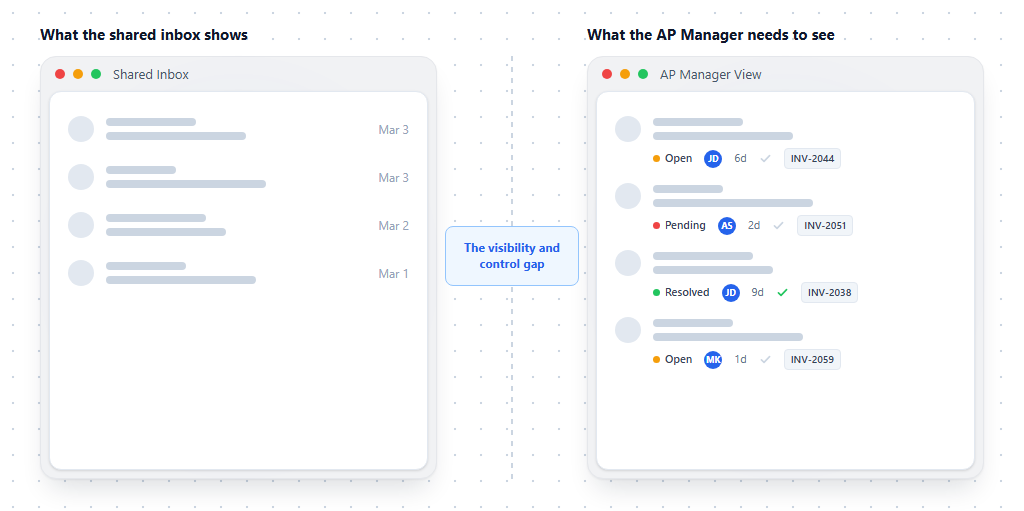
What AP Managers cannot see inside the shared inbox: the visibility and control gap
The problem does not stop at the individual AP clerk. It compounds at the management level, because the shared inbox offers almost no operational visibility. An AP Manager looking at a shared mailbox can see what has arrived. They cannot see, without significant manual effort, any of the following:
- Which queries have been responded to and which are still open.
- How long each open query has been waiting.
- Which supplier relationships are showing signs of strain because of slow or inconsistent responses.
- Whether a query has been picked up by two people and is being worked on in parallel.
- Which types of queries are generating the most volume, and why.
- Whether the response a colleague sent was accurate, or whether it created a follow-up query. The shared inbox was designed for communication, not case management. It does not record who took ownership of a query, what they said, or whether the supplier accepted the resolution. When something goes wrong, or when a supplier escalates to a Finance Director or a procurement lead, there is often no auditable record of what happened. For an AP Manager trying to report upward, this is the central frustration. They can tell you how many invoices were processed. They cannot easily tell you the status of an outstanding supplier dispute, or how long the average query took to resolve last month.
Why inbox rules and email templates do not fix the AP supplier communications problem
Most finance teams have tried to solve this. The fixes tend to follow a predictable pattern. Someone creates a set of inbox rules to route supplier emails by type. Someone else builds a folder structure. A senior AP clerk drafts a set of template responses for the most common queries. The ERP team is asked whether there is a supplier portal or a self-service option. These are reasonable responses to the symptoms. They do not address the root cause. The reason the AP inbox is slow is not that it is disorganised. It is that every response requires context that lives somewhere else, in the ERP, in the matching layer, in a payment run schedule, in a colleague’s email thread. The inbox cannot access that context. The person answering the email has to go and find it manually every time. Inbox rules do not close that gap. Templates do not close it. A folder structure does not close it. The query volume also continues to grow.
As supplier bases expand, as procurement becomes more distributed, and as finance teams operate across more entities and jurisdictions, the number of supplier communications arriving each week increases. The manual lookup model does not scale. The team gets bigger, or it gets slower, or both. Supplier portals are sometimes proposed as an alternative. They can reduce inbound query volume for certain query types. But they require supplier adoption. According to Ardent Partners, only 40% of AP teams cite enabling more suppliers to submit invoices electronically as a top priority this year, even among teams actively investing in automation. The long tail of email communication is not going away on its own.
Inbox rules don’t close the gap. Templates don’t close it. The problem is that every response requires context that lives somewhere else, and the inbox cannot access it.
What good supplier query management actually looks like The operational alternative is not about faster typing or better-organised folders. It is about changing where the context lives relative to the query. When AP supplier communications work correctly, a few things are structurally different:
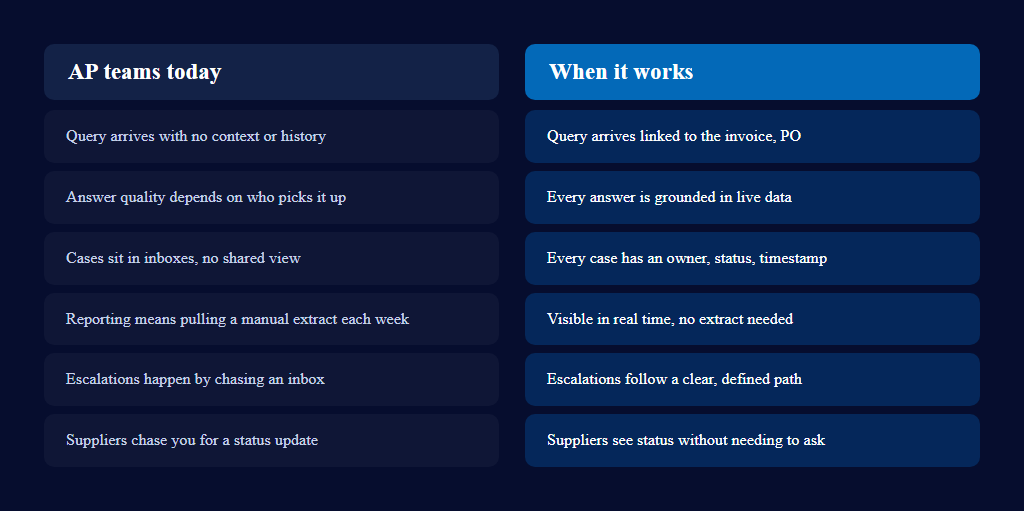
- Every incoming supplier communication arrives alongside the AP data relevant to it, so the person responding starts from an answer, not a blank screen.
- Every query is owned, tracked, and visible from the moment it arrives to the moment it is resolved.
- Routine queries are handled consistently, without the response quality depending on who picked up the email that morning.
- AP Managers can see, in real time, what is open, what is overdue, and where supplier relationships need attention. The goal is not to remove human judgement from supplier communication. It is to stop wasting experienced AP staff on manual data retrieval, and to give finance leadership the visibility they need to manage the function confidently.

Spend less time searching and answering.
Pupose-built AP Query Management.

Frequently askedquestions
Enough that it becomes a full-time task rather than an occasional interruption and every one typically requires its own manual trip into the ERP before anyone can reply.
Because the context needed to answer it (invoice status, PO match, goods receipt, payment run) lives in the ERP, not in the inbox. Answering one query usually means four to six manual steps: reading the email, searching the ERP, checking the PO, confirming the payment run, then drafting a reply.
The process of receiving, tracking, and resolving supplier questions about invoice or payment status in a way that gives both the AP team and management visibility into what's open, who owns it, and how long it's been waiting — rather than letting it live as unstructured email.
Because they organize communication, not the underlying data. Folders and templates don't give the person answering access to live invoice, PO, or payment information, so every reply still starts with a manual ERP lookup.
By tracking each query as an owned case with a status and timestamp, rather than an email sitting in a shared inbox — recording who picked it up, what was said, and whether it was resolved, so the pattern is visible without pulling a manual weekly report.